
Live in a day. Not a quarter.
Three clear steps take your agency from scattered spreadsheets and WhatsApp updates to GPS-stamped proof and automated Form B compliance.
Bring your buildings, equipment & field team in minutes.
Add client buildings and assets manually or drop in your existing Excel register — then invite your technicians with Staff IDs and 6-digit PINs.
- Map towers, basements, floors, zones, extinguishers, hydrants & pumps
- Upload `.xlsx` / `.csv` sheets directly with validation before import
- Assign technicians to sites and set monthly, quarterly, or annual cycles


Completed floors, pressure readings, defect flags, and camera photos appear directly on the office dashboard.
Your field team inspects offline, with GPS-stamped proof.
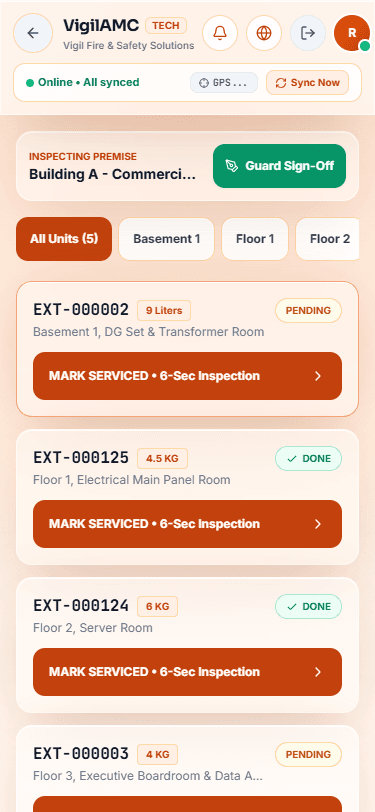
Technicians follow guided floor and zone checklists in their preferred Indian language, capture rear-camera photos with GPS coordinates, and record voice remarks — even with zero basement signal.
- Lock-screen push alerts wake technicians for urgent work orders
- Local outbox stores inspections safely offline and syncs automatically
- Office sees live building progress and flagged defects immediately
Form B reports, client alerts & renewals go out automatically.
No Sunday nights stitching photos into Word documents. Generate your 5-page white-label Form B PDF in minutes, email due-date alerts, and let clients check their Portal anytime.
Stamped with your agency header, license number, verified units & signatory block.

Realistic rollout
Your first week on VigilAMC.
Honest day-by-day pace — no enterprise consulting required.
Setup
Add your buildings and import your existing Excel equipment sheet, then invite your technicians.
First inspections
Technicians run live checklists offline on Android with GPS-stamped camera photos.
First reports to clients
Export your first 5-page white-label Form B PDF and share Portal access in one click.
You're running on it
Recurring service cycles, overdue alerts, and repair re-scheduling run on autopilot.
Statutory Responsibility Note: VigilAMC compiles inspection records into standardized 5-page Form B formats aligned with IS 2190 and NBC 2016 Part 4. Final legal certification and authority submission remain signed and stamped by a licensed fire-safety contractor.
Ready? Book a Free Demo.
Bring one Excel register to a 15-minute call — we'll show you your buildings running live.